Product Updates: June 03, 2025
Last updated: October 12, 2026
Changes to Clients Page
New data points in the Clients table:
Current Commitment — The total commitment amount across all active loans for each client
Outstanding Balance — The total outstanding loan balance for each client
Total Overdue — The sum of all overdue payments on active loans
Warrants Value — The total value of warrants held for clients with equity
Shares Value — The total value of shares held for clients with equity
Next Payment Date — The next expected payment date for each client
Last Payment Date — The date of the client's most recent payment
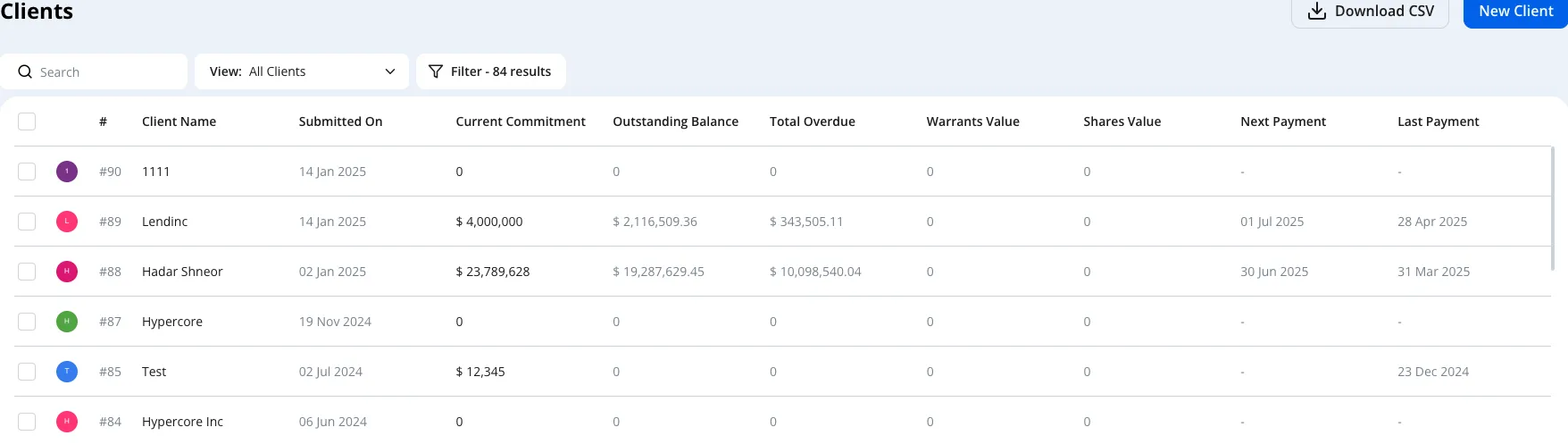
Enhanced Filtering Options:
Filter clients by key metrics including balances, payment dates, and submission dates—or use the archive toggle to view only inactive clients
Create custom views by saving your preferred filter combinations for quick access to frequently referenced client lists

To view clients with active loans, search for clients with a Current Commitment greater than 1.
New Field Type: Percentage
We’ve added a new property field type: Percentage.
This field type enables clearer data presentation by displaying values in percentage format.
Note: To convert an existing decimal or number field to a percentage, contact your Hypercore Customer Success Manager.

Updated Equity Management Features
Owners - You can now assign owners to any equity entity.
Return of Capital - Track capital returns to equity separately from profits with our new Return of Capital transaction type support, enabling more precise reporting.
Global Search: Funding Entities
We’ve added funding entities to Global Search functionality.

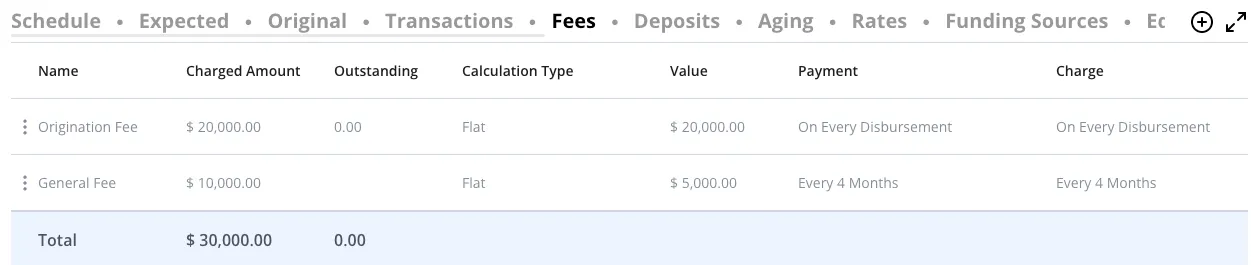
Display Totals on Tables
We’ve added a summary row that displays cumulative amounts such as Charged Amount and Outstanding for Fees, Deposits, and OID Components.
New Fee Calculation: % of Interest Repayment
We’ve added a new fee calculation method: “% of Interest Repayment,” so fees are charged only on the interest portion - not the full repayment.
Funding Sources: Import OID Values
You can now import and overwrite OID Values for funding sources through both the funding source page and bulk actions panel.
Loan Schedule: OID Cost Breakdown
We’ve added a detailed breakdown in the OID Cost column of the loan schedule that displays the current amount along with amortized and unamortized components.

Deposits: Exclude Fees on Deposit Payment Date
We’ve introduced a new condition that allows excluding fees due on the deposit payment date from being deducted from the deposit. This is especially helpful for deposits paid on a disbursement date.