Advanced Loan Settings
Last updated: June 9, 2026
A comprehensive guide to Advanced Settings available on the Loan Terms page - Settings section - what each flag does, when to enable it, and how it affects interest accrual, principal, schedules, and funding.
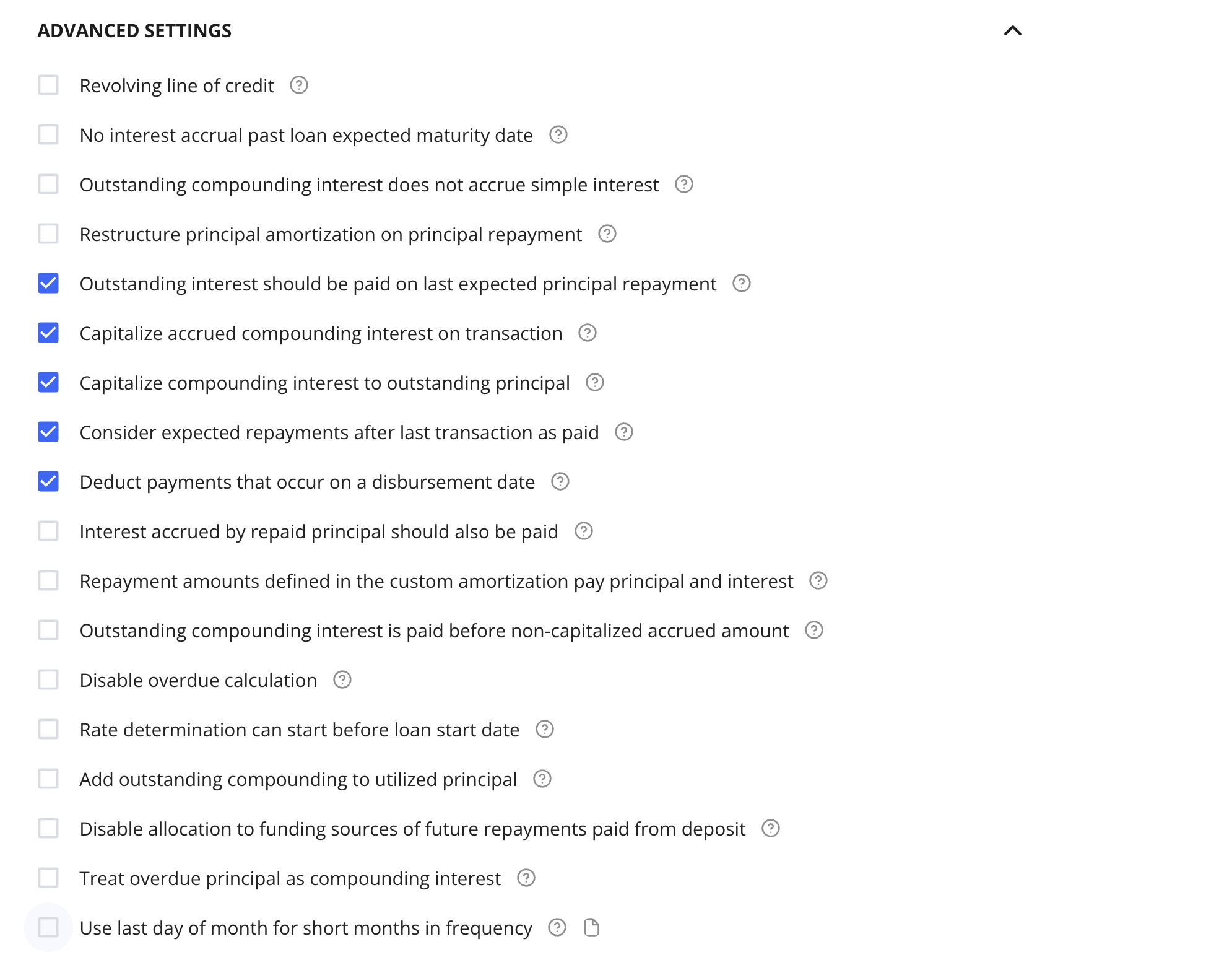
Overview
The Advanced Settings section appears at the bottom of the Loan Terms page (collapsible). These flags control specialized behaviors for interest accrual, principal management, repayment scheduling, and funding source logic that go beyond the defaults of a standard loan template.
Key principles to keep in mind:
Most flags should be set at the loan product / template level so every loan of that type inherits the configuration automatically.
Changing flags on individual loans is possible but should be an exception, not a routine workflow.
1. Revolving Line of Credit
What it does:
Marks the loan as a revolving line of credit rather than a standard term loan.
Behavior:
Adds Revolving Period Starts and Revolving Period Ends date inputs to the principal section.
2. No Interest Accrual Past Loan Expected Maturity Date
What it does:
Stops all interest accrual once the loan reaches its expected maturity date - even if there is remaining outstanding principal or outstanding compounding interest.
3. Outstanding Compounding Interest Does Not Accrue Simple Interest
Prerequisite: This flag only applies when the loan has both a compounding interest stream and a simple interest stream configured simultaneously.
Flag behavior (on):
The outstanding compounding interest balance will not accrue simple interest.
The compounding interest balance grows only through its own capitalization events, not through additional simple interest charges.
When to Use:
Loans structured with both a simple interest component and a compounding interest component, where the lender does not want the compounding interest balance to also be charged simple interest.
4. Restructure Principal Amortization on Principal Repayment
What it does:
Recalculates future scheduled principal payments whenever an actual principal repayment occurs.
Flag behavior (on):
When any principal repayment is recorded (partial or full), Hypercore re-runs the amortization calculation using:
The remaining outstanding principal at that point in time, and
The remaining number of scheduled payments.
Practical effects:
If the borrower underpays relative to schedule → future expected payments increase.
If the borrower overpays → future expected payments decrease.
When to use:
Amortizing loans where the schedule should dynamically adjust to actual repayment behavior rather than remain static.
5. Outstanding Interest Should Be Paid on Last Expected Principal Repayment
What it does:
Ensures all outstanding interest is cleared when the loan reaches the final expected principal repayment date.
Behavior:
On the last scheduled principal repayment date, the following are automatically treated as due:
Standard outstanding interest
Outstanding compounding interest
Non-capitalized accrued compounding interest
This aligns with the common expectation that at maturity, the full loan balance — including all interest — goes to zero when viewed on the expected schedule.
6. Capitalize Accrued Compounding Interest on Transaction
What it does:
Moves all non-capitalized accrued compounding interest into the outstanding (capitalized) balance whenever any transaction occurs.
Two-stage compounding interest lifecycle:
Compounding interest accrues into a non-capitalized bucket — it does not yet generate further interest.
Upon capitalization, it moves into the outstanding compounding balance — from here it accrues interest.
Flag behavior (on):
Any transaction (repayment, disbursement, waiver, fee, etc.) triggers capitalization of all accrued, non-capitalized compounding interest.
7. Capitalize Compounding Interest to Outstanding Principal
What it does:
When compounding interest capitalizes, it is merged directly into the principal balance rather than sitting in a separate outstanding compounding balance.
Behavior:
Capitalized compounding interest increases the principal balance directly.
There is no separate "outstanding compounding interest" line — the principal becomes the single outstanding balance.
8. Consider Expected Repayments After Last Transaction as Paid
What it does:
Controls how Hypercore treats past expected payments for which no actual transaction has been recorded — specifically in relation to the last real transaction entered.
Flag behavior (on):
Expected repayments that fall after the date of the last recorded real transaction are automatically treated as paid and reduce the outstanding balance accordingly.
This keeps the schedule and outstanding balance consistent and accurate even when actual payment transactions are being uploaded with a delay.
Once the real transactions are entered into the system, they replace the assumed payments and the outstanding balance adjusts to reflect actual data.
Critical use case:
Portfolios where payment files are uploaded in bulk and with a delay (e.g., payments collected daily but uploaded weekly).
Prevents the outstanding balance from appearing inflated during the window between when payments are received and when they are formally recorded in Hypercore.
9. Deduct Payments That Occur on a Disbursement Date
What it does:
Merges a disbursement and a payment occurring on the same date into a single net row on the schedule display - without changing any underlying accounting.
Behavior:
If a disbursement and a payment share the same date, the schedule shows one row with the net disbursement amount.
10. Interest Accrued by Repaid Principal Should Also Be Paid
What it does:
When principal is repaid, the proportional interest accrued on that specific portion of principal is also repaid alongside it.
Example:
Item | Amount |
|---|---|
Single disbursement | 100,000 |
Interest accrued | 20,000 |
Principal repaid (10%) | 10,000 |
Interest also paid (10% of bucket) | 2,000 |
11. Repayment Amounts Defined in the Custom Amortization Pay Principal and Interest
What it does:
Defines how amounts entered in a custom amortization grid are allocated between interest and principal.
Flag behavior (on):
The amount defined in the custom amortization grid:
First pays down interest to zero (including compounding interest, depending on setup)
Any remaining amount is applied to principal
Flag behavior (off):
The custom amortization grid defines principal payments only — interest is handled separately and independently.
When to use:
Structures using compounding interest where the lender wants the full payment amount to settle interest before touching principal.
Clients who want a single payment figure that covers all obligations in the correct waterfall order.
12. Outstanding Compounding Interest Is Paid Before Non-Capitalized Accrued Amount
What it does:
Controls the payment waterfall within compounding interest — specifically, which portion is reduced first when a compounding interest payment is made.
Two components of compounding interest:
Outstanding (capitalized) — already earns further interest
Non-capitalized accrued — has accrued but not yet been moved to the capitalized balance
Flag behavior (on):
Payments hit the outstanding (capitalized) portion first, then the non-capitalized accrued amount.
Flag behavior (off — default):
Payments hit the non-capitalized amount first, then the outstanding balance.
13. Disable Overdue Calculation
What it does:
Turns off Hypercore's standard overdue calculation for loans where frequent restructurings make the overdue number misleading.
Flag behavior (on):
Overdue computation is disabled entirely. The loan balance is managed through restructuring events and actual transactions, without an ongoing overdue counter.
14. Rate Determination Can Start Before Loan Start Date
What it does:
Allows a loan's floating-rate determination to align with a portfolio-wide or calendar-based rate schedule, even when the loan itself starts mid-period.
Flag behavior (on):
A loan starting mid-period (e.g., on the 12th of the month) can still pick up the rate set at the beginning of that period — matching the broader portfolio rate calendar rather than starting a new rate period from its own start date.
15. Add Outstanding Compounding to Utilized Principal
What it does:
Counts outstanding compounding interest as part of the utilized principal balance for utilization and availability calculations.
Behavior:
Outstanding compounding interest is added to the utilized principal amount.
This reduces the remaining available credit on a revolving or credit-limit facility accordingly.
16. Treat Overdue Principal as Compounding Interest
What it does:
When enabled, unpaid expected principal payments are added to compounding interest overdue instead of principal overdue.
Impact: Affects how overdue amounts are classified and whether they are included in future compounding interest calculations.
17. Use last day of month for short months in frequency
What it does:
When enabled, if the configured frequency day does not exist in a month, the calculated date uses the last valid day of that month instead of rolling into the next month.
18. Disable allocation to funding sources of future repayments paid from Deposit
What it does:
When enabled, future repayments paid from deposit will not be auto-allocated to funding sources.